
How to archive a retail stock take
If you've finished a stock take and no longer need it, you can now archive it. Similarly, if you've started a stock take and want to discard it or have a stock take you no longer need, you can also archive it.
This will remove it from the stock takes list and move it to an archived status.
Helping to keep your stock takes list clean and easy to manage.
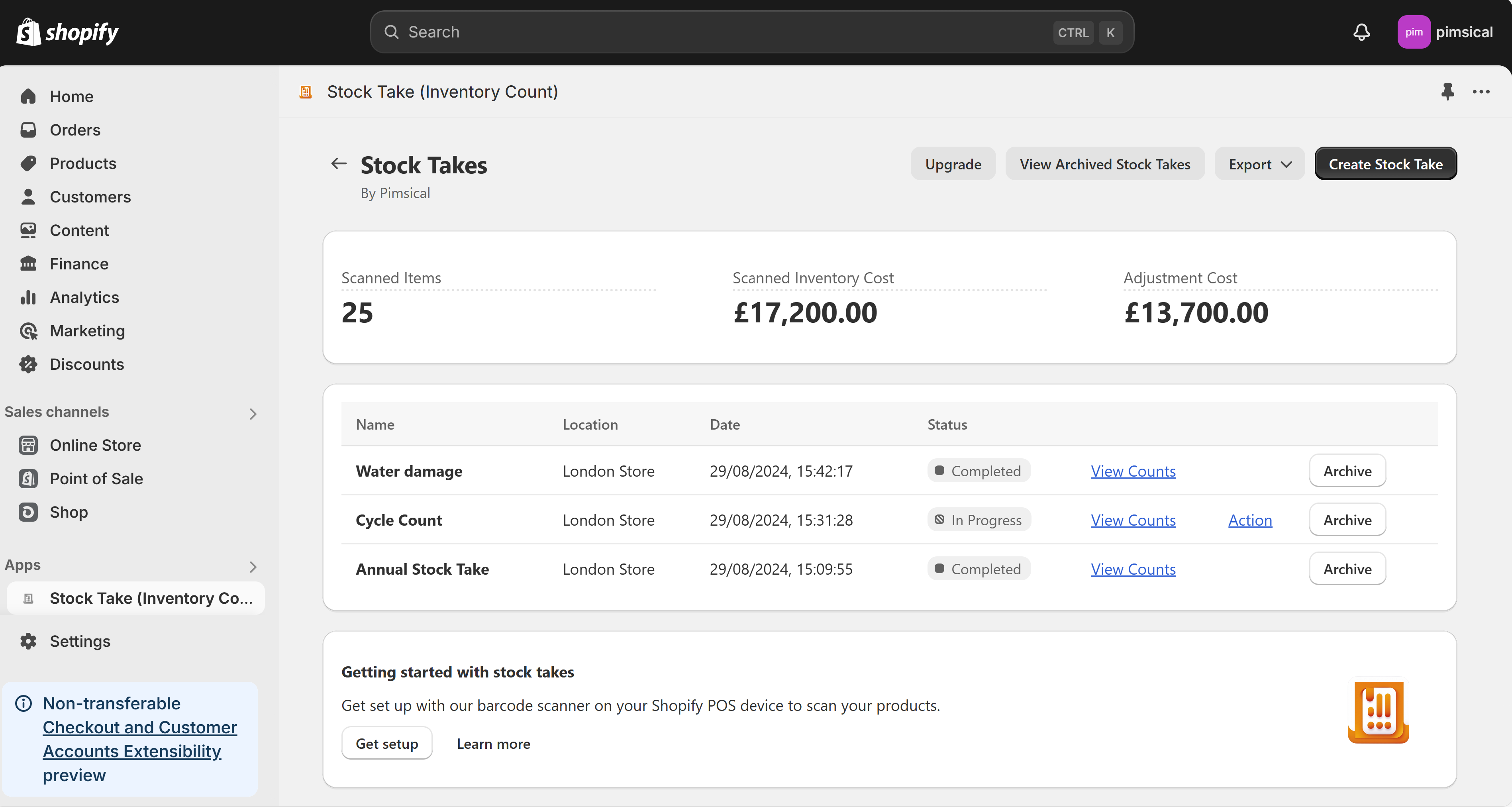
To archive a stock take, you can do this from the Shopify Admin on a laptop.
Open the Stock Takes (Inventory Count) by Pimsical app, find the stock take(s) you would like to archive and click the Archive button.
Start your Stock Take Today
Contact Us
Got any questions about getting ready for retail or stock takes with Shopify? Get in touch, we would love to chat!

By Jordan Finneran
Jordan Finneran is the founder of Pimsical, a Shopify app business helping merchants simplify inventory management and retail operations. His apps have powered over 19,000 stock takes and inventory workflows — for businesses ranging from single-store brands to major European retailers. Jordan's also the winner of the 2025 Shopify Build Community Award, and brings hands-on experience from renowned fitness brand Gymshark and popular Shopify app Checkout Blocks, giving him a deep, practical understanding of what actually works on Shopify. Today, he works directly with Shopify merchants to bring their backend and retail operations under control.